INTEGRASMART TECH · PRACTICAL GUIDES
Getting started with your Air Radar flight tracker
Set up Wi-Fi, choose your location and understand aircraft coverage.
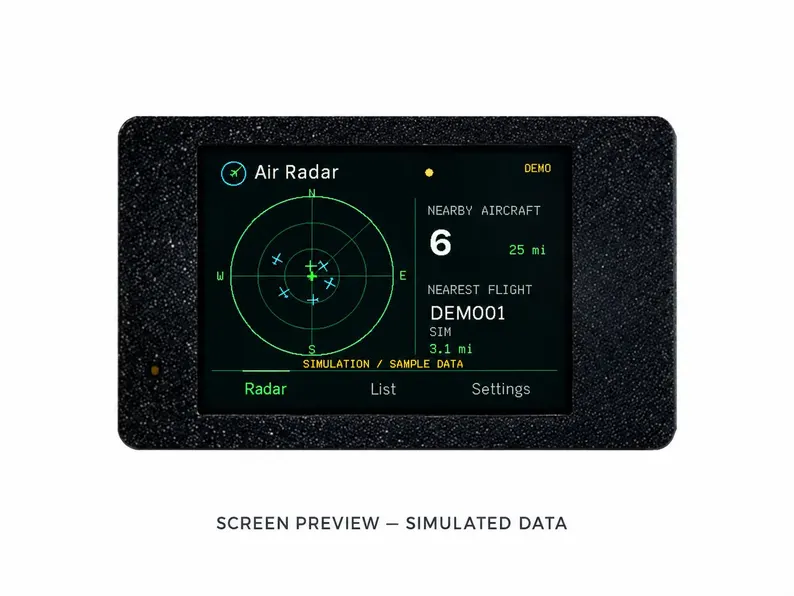
What Air Radar displays
Air Radar is a USB-powered desktop display that receives aircraft information through an internet data feed. It does not receive aircraft radio signals directly and does not require an ADS-B antenna. Feed availability determines which aircraft appear; an empty screen does not always mean the device is broken.
Power and Wi-Fi
Connect USB power, then follow the firmware setup prompts to connect to a 2.4 GHz Wi-Fi network with internet access. A network that requires a browser sign-in may prevent the device from reaching the data service. If no data appears, check power, network access and the selected location before reinstalling firmware.
Choose your location
Use US ZIP lookup in the United States, or enter latitude and longitude manually where the feed offers coverage. Check the signs of your coordinates: US longitudes are generally negative. You can change location in settings. Touch an aircraft to see details, or use Auto to cycle through the list.
License and troubleshooting
The assembled Air Radar includes a software license; you do not need to buy a separate license for that device. For help, send your order number, firmware version and a description of the problem through the contact form. Air Radar is for hobby use, never navigation or safety decisions. Orders require 2 days of preparation before carrier transit.